

Learn Arduino, lesson 3 of 27
Arduino Setup and Installation
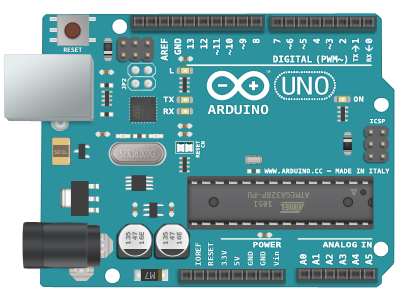
About Arduino
Arduino boards are able to read inputs –light on a sensor, a finger on a button, or a Twitter message –and turn it into an output –activating a motor, turning on an LED, publishing something online.
Getting the Arduino Ready
So we all can get started with the world of physical computing :
- First you must have your Arduino board (Arduino Uno) and a USB cable
- Download Arduino IDE Software
- or Download Pictoblox
- Power up your board by connecting it via USB
- Launch IDE
Using the Arduino IDE, you will have to run the application file as shown in the below picture.
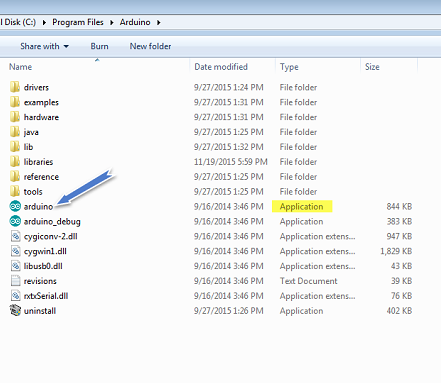 Run the Application file
Arduino IDE
- Create your first project
- Now open the file given to you
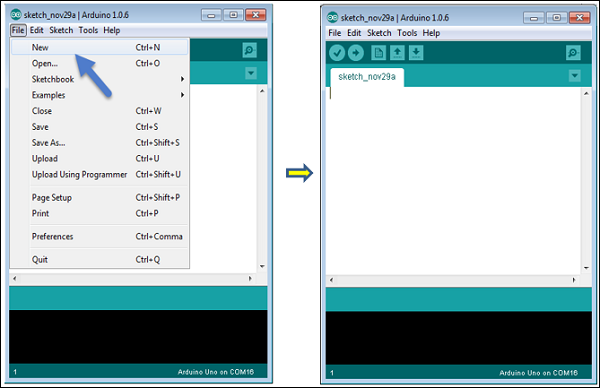
We are ready to start Physical Computing with Arduino.
Compiling: the IDE checks your code and turns it into 1s and 0s the chip understands.
Let us start the "Hello World" of Physical Computing that is called as the blink.