

ESP32, ESP8266 & Raspberry Pi, lesson 30 of 33
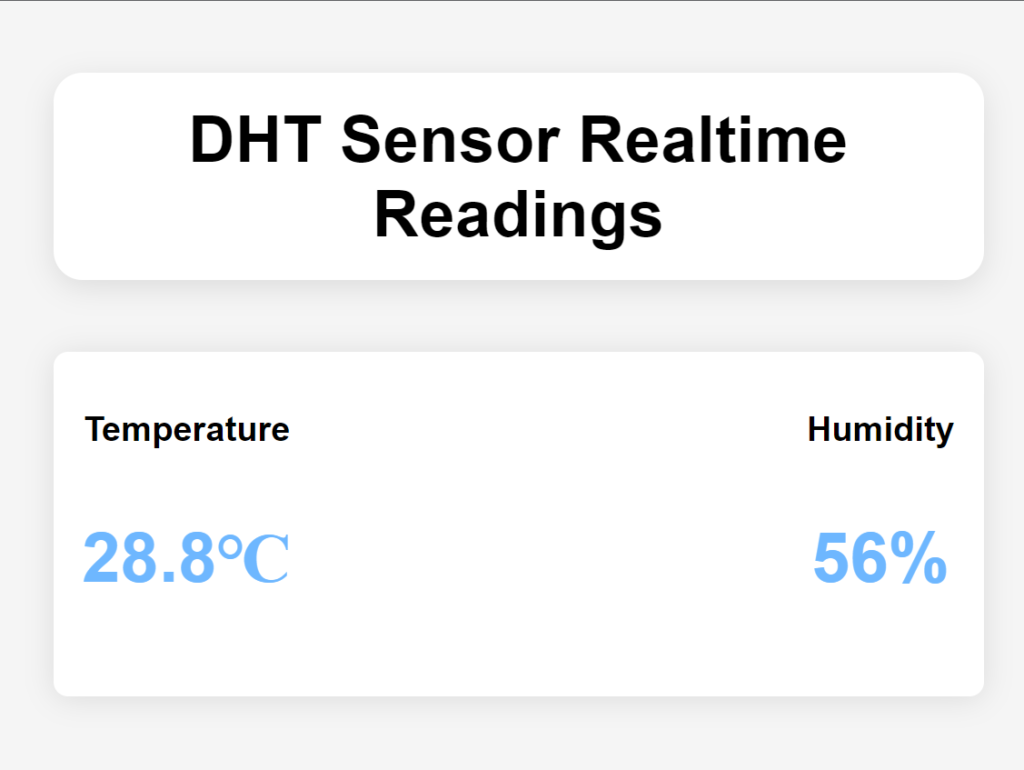
Code for DHT11 Sensor Reading Web Application
Need the HTML? This lesson's web page uses HTML. Learn just the tags you need in HTML for Gadgets, or keep the cheat sheet open.
The phone's browser sends a request through the router to the ESP32's IP address. The ESP32 reads the sensor and sends a response: a web page. Tap a button.
<!DOCTYPE html>
<html>
<head>
<meta charset="utf-8">
<meta name="viewport" content="width=device-width, initial-scale=1">
<title>DHT Readings</title>
<style type="text/css">
body{
background-color: #F5F5F5;
font-family: Arial, sans-serif;
margin: 0;
padding: 0;
}
.data-container{
display: flex;
justify-content: space-between;
width: 50%;
margin: 50px auto;
padding: 20px;
background-color: #FFF;
box-shadow: 0 2px 20px rgba(0, 0, 0,0.1);
border-radius: 10px;
}
.data-item{
text-align: center;
}
.data-item h2{
font-size: 24px;
font-weight: bold;
margin-bottom: 10px;
}
.data-item p{
font-size: 48px;
font-weight: bold;
color: #6EB7FF;
}
.data-head{
margin: auto;
width: 50%;
text-align: center;
font-size: 45px;
font-weight: bold;
margin: 50px auto;
padding: 20px;
background-color: #FFF;
box-shadow: 0 5px 20px rgba(0, 0, 0, 0.1);
border-radius: 20px;
}
</style>
</head>
<body>
<div class="data-head">DHT Sensor Realtime Readings</div>
<div class="data-container">
<div class="data-item">
<h2>Temperature</h2>
<p class="value" id="temperature">22 ℃</p>
</div>
<div class="data-item">
<h2>Humidity</h2>
<p class="value" id="humidity">10%</p>
</div>
</div>
<!-- the scripts for products you want to access must be added-->
<script src="https://www.gstatic.com/firebasejs/8.6.8/firebase-app.js"></script>
<script src="https://www.gstatic.com/firebasejs/8.6.8/firebase-database.js"></script>
<script type="module">
// Import the functions you need from the SDKs you need
import { initializeApp } from "https://www.gstatic.com/firebasejs/9.20.0/firebase-app.js";
// TODO: Add SDKs for Firebase products that you want to use
// https://firebase.google.com/docs/web/setup#available-libraries
// Your web app's Firebase configuration here (Do not use the existing configuration)
const firebaseConfig = {
apiKey: "thisisyourapikeyheredontusemine",
authDomain: "fir-database-connection-343f0.firebaseapp.com",
databaseURL: "https://fir-database-connection-343f0-default-rtdb.asia-southeast1.firebasedatabase.app",
projectId: "fir-database-connection-343f0",
storageBucket: "fir-database-connection-343f0.appspot.com",
messagingSenderId: "252315881961",
appId: "1:252315881961:web:15f2a5550e286320aa7b78"
};
// Initialize Firebase
firebase.initializeApp(firebaseConfig);
// getting reference to the database
var database = firebase.database();
//getting reference to the data we want
var dataRef1 = database.ref('DHT_11/Humidity');
var dataRef2 = database.ref('DHT_11/Temperature');
//fetch the data
dataRef1.on('value', function(getdata1){
var humi = getdata1.val();
document.getElementById('humidity').innerHTML = humi + "%";
})
dataRef2.on('value', function(getdata2){
var temp = getdata2.val();
document.getElementById('temperature').innerHTML = temp + "℃";
})
</script>
</body>
</html>