

ESP32, ESP8266 & Raspberry Pi, lesson 12 of 33
Task Automation with Simple Timer using the ESP32
timer.setInterval(1000, toggleLED) and timer.setInterval(3000, readSensor): each job runs on its own clock, and timer.run() in the loop keeps them going. No delay() needed.
Download the SimpleTimer Library before uploading the code on to the ESP32.
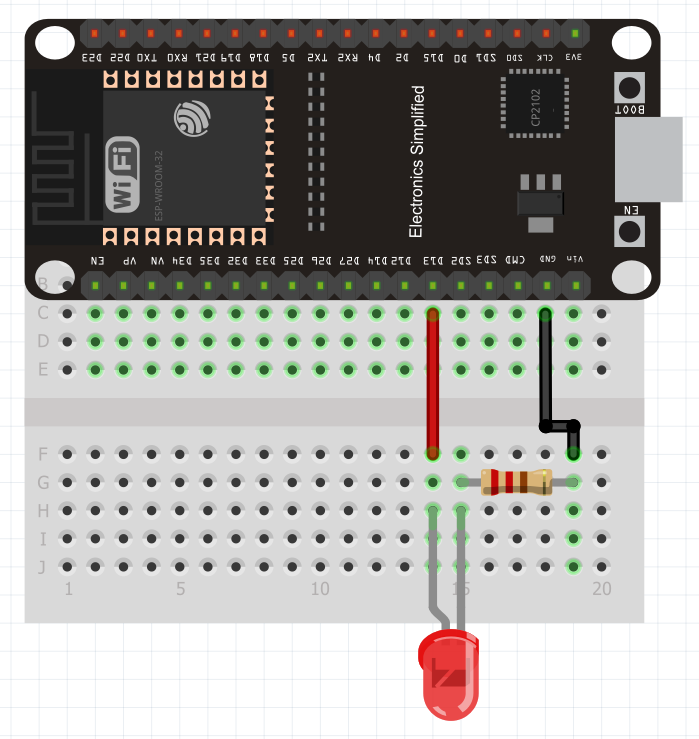
Case 1 : Toggle LED
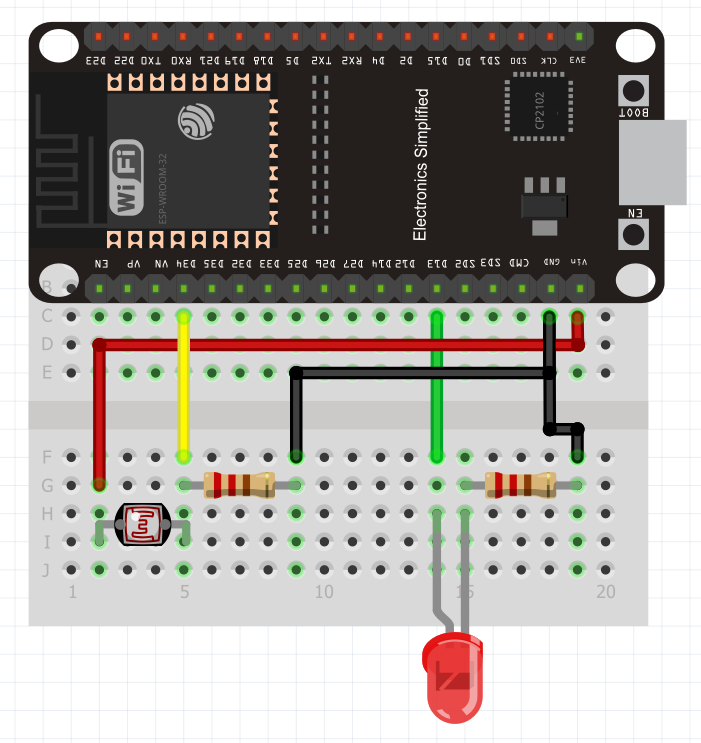
Case 2 : Task Automation by Reading Sensor
#include<WiFi.h>
#include<SimpleTimer.h>

const int ledPin = 13;
const int ldrPin = 34; //same side of the ESP32

SimpleTimer timer;

void setup() {
  // put your setup code here, to run once:
  Serial.begin(115200);
  pinMode(ledPin,OUTPUT);
  pinMode(ldrPin,INPUT);
  timer.setInterval(2000,readSensor);
}

void loop() {
  // put your main code here, to run repeatedly:
  timer.run();

}

void toggleLED(){
  digitalWrite(ledPin, !digitalRead(ledPin));
  //HIGH --> LOW
  //LOW  --> HIGH
}

void readSensor(){
  //read the sensor
  int ldrValue = analogRead(ldrPin);
  Serial.print("Sensor Reading :");
  Serial.println(ldrValue);

  //set the threshold
  int threshold = 1200;

  //if sensor reading is greater than turn off the LED
  if (ldrValue> threshold){
    digitalWrite(ledPin,LOW);
    Serial.println("LOW");
  }
  else{
    digitalWrite(ledPin,HIGH);
    Serial.println("HIGH");
  }


}